

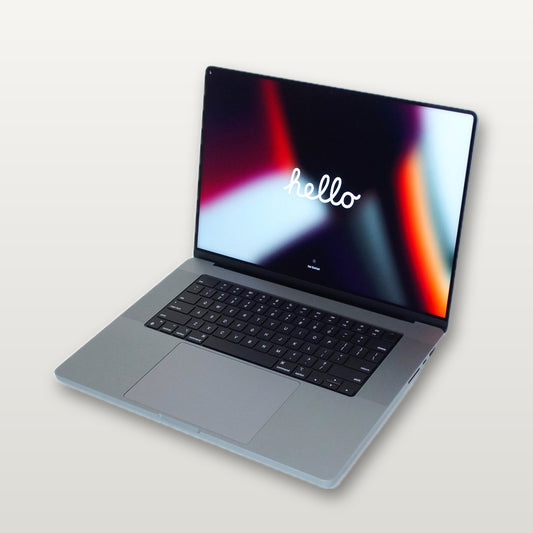



MacBook Pro M4 vs M3 — Is It Worth Upgrading? Complete Comparison
MacBook Pro M4 vs M3 — Is It Worth Upgrading? Complete Comparison
By Ramzan "Ray" Harji, Certified Apple Refurbisher · MacPro-LA, Hollywood · 15 years & 100,000+ Macs sold · Updated June 2026
Quick answer
From MacPro-LA — LA's highest-rated Apple reseller. 15 years in Hollywood, 3,500+ reviews, Certified Apple Refurbisher. Honest, real-world guidance from a team that inspects every device in person. Read on for what we've learned and how to apply it.
Apple released the MacBook Pro with M4 chips in late 2024, and now that we're well into 2026, the real question on everyone's mind is: should you buy the M4 or save money with the M3?
We've tested both extensively at our store, and the answer isn't as straightforward as Apple's marketing suggests. Here's our honest, side-by-side breakdown.
Quick Answer
Buy the M4 if: You need the absolute latest, plan to keep your laptop 5+ years, or use intensive AI/ML workloads.
Buy the M3 if: You want to save $400-700 and still get a machine that handles everything most professionals throw at it. The M3 is the smarter buy for 80% of people.
Performance Comparison
M4 Pro vs M3 Pro
| Spec | M4 Pro | M3 Pro | Difference |
|---|---|---|---|
| CPU Cores | 14-core | 12-core | +17% |
| GPU Cores | 20-core | 18-core | +11% |
| Unified Memory | 24GB base | 18GB base | +33% |
| Memory Bandwidth | 273 GB/s | 150 GB/s | +82% |
| Neural Engine | 16-core (38 TOPS) | 16-core (18 TOPS) | +111% AI |
| Thunderbolt | Thunderbolt 5 | Thunderbolt 4 | 2x bandwidth |
| Battery Life | Up to 24 hours | Up to 22 hours | +2 hours |
M4 Max vs M3 Max
| Spec | M4 Max | M3 Max | Difference |
|---|---|---|---|
| CPU Cores | 16-core | 16-core | Same |
| GPU Cores | 40-core | 40-core | Same count, faster |
| Unified Memory | 48GB base (up to 128GB) | 48GB base (up to 128GB) | Same |
| Memory Bandwidth | 546 GB/s | 400 GB/s | +37% |
| Neural Engine | 16-core (38 TOPS) | 16-core (18 TOPS) | +111% AI |
Real-World Performance — What You'll Actually Notice
Video Editing (Final Cut Pro / DaVinci Resolve)
The M4 Pro renders 4K timelines about 15-20% faster than the M3 Pro. For occasional video editors, you won't feel much difference. For full-time video professionals editing daily, those saved minutes add up. The M3 Pro still handles 4K editing smoothly — it's only in 8K workflows or heavy effects stacking where the M4 pulls ahead noticeably.
Software Development (Xcode / Docker / VS Code)
Compilation times are roughly 15% faster on M4 Pro vs M3 Pro. Both machines handle large projects, Docker containers, and multiple IDEs without breaking a sweat. If you're building iOS apps or working with large monorepos, the extra RAM on the M4 Pro (24GB base vs 18GB) is the bigger advantage here.
Photo Editing (Lightroom / Photoshop)
Virtually identical for photo editing workflows. The M3 Pro handles hundreds of RAW files, complex Photoshop composites, and Lightroom catalogs with ease. The M4 doesn't provide a meaningful improvement for this type of work.
AI and Machine Learning
This is where the M4 genuinely shines. The Neural Engine's jump from 18 TOPS to 38 TOPS is massive — more than double. If you're running local AI models, training machine learning models, or using AI-powered creative tools, the M4 is a significant upgrade. For everyone else, this difference is invisible in daily use.
Everyday Use (Web, Email, Office)
Zero noticeable difference. Both machines launch apps instantly, handle 30+ browser tabs, run Zoom calls, and manage office work without any lag. You could go back to an M1 and still not feel limited for basic tasks.
Display and Build Quality
Identical. Both the M3 and M4 MacBook Pro use the same Liquid Retina XDR display with ProMotion (120Hz), same brightness levels, same P3 wide color gamut. The chassis design is the same. The keyboard, trackpad, speakers, and port selection are all the same.
The only hardware difference is Thunderbolt 5 on the M4 (vs Thunderbolt 4 on M3) — which matters if you're connecting to high-speed external storage or multiple 6K displays. For most people, this is irrelevant.
The Price Difference — This Is What Matters
| Configuration | M4 (New) | M3 (Refurbished at MacPro-LA) | You Save |
|---|---|---|---|
| 14" Pro chip | $1,999 | $1,099 | $900 |
| 14" Max chip | $3,499 | $1,799 | $1,700 |
| 16" Pro chip | $2,499 | $1,399 | $1,100 |
| 16" Max chip | $3,499 | $1,899 | $1,600 |
That $900–$1,700 price difference is real money. For a 15-20% performance improvement that most people won't notice in daily work, you're paying almost double.
Who Should Buy the M4?
- Full-time AI/ML engineers running local models daily
- Video professionals editing 8K content or complex VFX
- Buyers who keep laptops 6+ years and want maximum future-proofing
- Anyone who needs Thunderbolt 5 for specific peripherals
- People whose employer is paying for it
Who Should Buy the M3? (Most People)
- Freelance creatives and professionals
- Software developers (the M3 handles everything)
- Students in creative or technical programs
- Small business owners who need a reliable workhorse
- Anyone who'd rather save $900+ and invest it elsewhere
- Photographers and graphic designers
- Music producers (Logic Pro runs perfectly on M3)
Our Honest Recommendation
After selling thousands of both M3 and M4 MacBook Pros, here's what we tell our customers: the M3 MacBook Pro is one of the best values in Apple's entire history.
When it launched, it was $1,699-$3,499. Now you can get one refurbished with a full 1-year warranty for $1,099-$1,899. That's a professional-grade machine at mid-range pricing.
The M4 is better on paper, but in the real world, 80% of buyers won't use the extra performance. Save the difference and put it toward software, peripherals, or your next upgrade in 3-4 years.
Frequently Asked Questions
Will the M3 MacBook Pro still get macOS updates?
Absolutely. Apple typically supports Mac hardware for 7-8 years with macOS updates. The M3 MacBook Pro launched in late 2023, so expect software support through at least 2030-2031.
Is the M3 MacBook Pro still being sold new?
Apple discontinued the M3 MacBook Pro line when the M4 launched. You can still find new-old-stock at some retailers, but refurbished is where the real savings are — same machine, tested and warrantied, for hundreds less.
Can I upgrade the RAM or storage later?
No. On both M3 and M4 MacBook Pros, the memory and storage are built into the chip package and cannot be upgraded after purchase. This is why it's important to choose the right configuration upfront. If you're unsure, call us at (323) 378-5603 and we'll help you pick the right spec.
Does the M3 support Apple Intelligence?
Yes. All Apple Silicon Macs (M1 and newer) with 8GB or more unified memory support Apple Intelligence features introduced in macOS Sequoia and later. Both the M3 and M4 fully support it.
Browse MacBook Pro Models
Ready to decide? Check out our full lineup of tested and certified MacBook Pro models — M1 through M4, all with 1-year warranty and free 2-day shipping.
Visit us at 1947 N. Cahuenga Blvd #104, Hollywood, or call/text (323) 378-5603.
