




Best Mac for Video Editing on a Budget (2026 Guide)
By Ramzan "Ray" Harji, Certified Apple Refurbisher · MacPro-LA, Hollywood · 15 years & 100,000+ Macs sold · Updated June 2026
Quick answer
From MacPro-LA — LA's highest-rated Apple reseller. 15 years in Hollywood, 3,500+ reviews, Certified Apple Refurbisher. Honest, real-world guidance from a team that inspects every device in person. Read on for what we've learned and how to apply it.
By Ray Harji, Apple Refurbishment Specialist at MacPro-LA | June 2, 2026
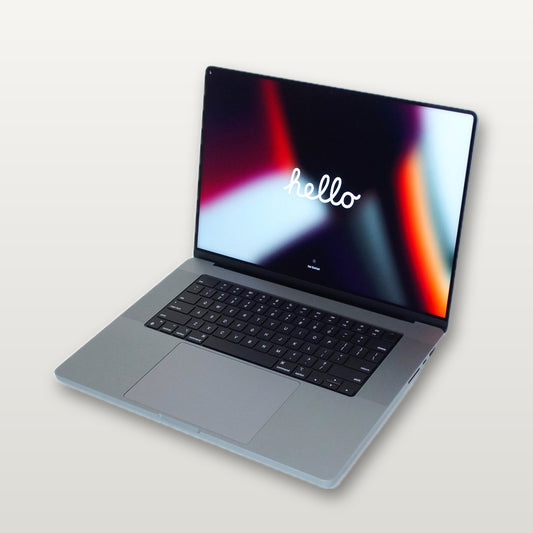
The best Mac for video editing on a budget in 2026 is a refurbished MacBook Pro 16-inch M2 Max ($1,499-$1,799 at MacPro-LA) or a refurbished Mac Studio M2 Max ($1,299-$1,599). Both handle 4K and 6K timelines in Final Cut Pro and DaVinci Resolve without breaking a sweat — and you save $800-$1,200 compared to buying new. After 15 years of building, repairing, and refurbishing Macs for editors and post-production houses right here in Hollywood, I can tell you that buying refurbished is exactly what the professionals do when they want top-tier performance without the Apple Store price tag.
Whether you're a YouTuber cutting your first long-form project, a film school student assembling a thesis, or a working editor building out a home suite, there's a refurbished Mac that fits your workflow and your budget. Here's everything you need to know.
Best Macs for Video Editing Ranked by Value
Not every editing job demands the same hardware. A solo creator cutting vlogs has very different needs than a colorist grading feature films. This table ranks the best Macs for video editing by overall value — meaning the gap between what you pay and what you get.
| Model | New Price (approx.) | Refurbished Price at MacPro-LA | Best For |
|---|---|---|---|
| Mac Studio M2 Max | $1,999 | $1,299-$1,599 | Best overall value for desktop editing |
| MacBook Pro 16" M2 Max | $2,499 | $1,499-$1,799 | Best portable editing workstation |
| MacBook Pro 16" M3 Pro | $2,499 | $1,799-$2,099 | Portable 4K editing with newer chip |
| MacBook Pro 14" M3 Pro | $1,999 | $1,399-$1,699 | Compact portable editing |
| iMac M3 | $1,299 | $999-$1,199 | Budget all-in-one with built-in display |
| Mac Studio M2 Ultra | $3,999 | $2,499-$2,999 | Multicam, 8K, and heavy VFX work |
| MacBook Pro 14" M2 Pro | $1,999 | $1,099-$1,399 | Entry-level pro editing on a budget |
| Mac Pro Tower M2 Ultra | $6,999 | $4,499-$5,499 | Maximum expandability for studios |
Every machine we sell at MacPro-LA goes through a full diagnostic and inspection process. Batteries are tested, screens are graded, and storage is verified. You get a working pro machine — not a gamble.
MacBook Pro vs Mac Studio vs iMac for Editing
This is the first real decision you need to make: do you need to edit on the go, or are you building a dedicated editing station?
MacBook Pro 16-inch: The Portable Powerhouse
The 16-inch MacBook Pro is the go-to machine for editors who work on set, travel between studios, or simply don't want to be chained to a desk. The M2 Max and M3 Pro variants handle 4K ProRes timelines in real time, and the 16-inch Liquid Retina XDR display is color-accurate enough for professional grading work.
If you're choosing between the 16-inch MacBook Pro Max and the standard 16-inch Pro models, the Max chips offer significantly more GPU cores and unified memory bandwidth. That matters when you're stacking effects, running Fusion compositions in DaVinci Resolve, or scrubbing through multicam timelines.
The 14-inch MacBook Pro is a solid option if you value portability over screen real estate. It uses the same chips, same ports, and same build quality — just in a smaller package. Many editors pair a 14-inch with an external monitor for a setup that's both portable and comfortable for long sessions.
Mac Studio: Maximum Desktop Performance per Dollar
The Mac Studio is, dollar for dollar, the best desktop editing machine Apple has ever made. It's small enough to mount behind a monitor, quiet enough to sit in an edit bay without acoustic treatment, and powerful enough to handle 4K, 6K, and (in Ultra configurations) 8K workflows without a hiccup.
For most editors, the Mac Studio M2 Max is the sweet spot. It gives you 12 CPU cores, 38 GPU cores, and up to 96GB of unified memory — all in a box the size of a thick paperback. At $1,299-$1,599 refurbished, it's the best value on this entire list.
iMac: The All-in-One Option
The iMac is the right call if you want a clean, simple setup with a built-in 4.5K Retina display. The M3 iMac handles 4K editing in Final Cut Pro and Premiere Pro without issues, and it's the most affordable way to get a complete editing setup — no external monitor needed.
The trade-off is that you're limited to M3 (not Pro or Max) chip configurations, so the iMac won't keep up with heavy multicam, 6K+, or effects-intensive work. But for straightforward cuts — YouTube content, short films, corporate video, wedding edits — the iMac punches well above its price.
Browse all of our refurbished Mac desktops to see what's currently in stock.
How Much RAM Do You Actually Need for Video Editing?
RAM — or unified memory, as Apple calls it on Apple Silicon — is where your active project lives while you work. More memory means larger timelines, more effects, and smoother playback. Here's the breakdown based on real-world editing scenarios:
32GB: The Minimum for Professional 4K Editing
If you're editing single-camera 4K projects in Final Cut Pro or Premiere Pro, 32GB is workable. You'll be able to scrub timelines, apply basic color corrections, and export without major issues. This is the floor for serious work — don't go below it.
64GB: The Sweet Spot for Multicam and Effects-Heavy Work
Multicam editing, motion graphics in After Effects, and DaVinci Resolve's Fusion page all benefit enormously from 64GB. If you're running multiple applications simultaneously — say, Resolve for color plus After Effects for compositing — 64GB gives you the breathing room to switch between them without waiting for things to reload.
96-128GB: 8K, VFX, and Large-Scale Post-Production
You'll find these configurations in the Mac Studio Ultra and the Mac Pro Tower. If you're working with RED V-RAPTOR 8K footage, building complex VFX pipelines, or running machine learning models for rotoscoping and object removal, this is your tier. Most individual editors won't need this — but if you're building a shared facility or a dedicated color suite, it's worth the investment.
A note on Apple Silicon unified memory: Because the CPU and GPU share the same memory pool on M-series chips, your GPU-accelerated effects (color grading, noise reduction, stabilization) draw from the same memory as your timeline. This is actually an advantage — there's no bottleneck copying data between CPU and GPU memory — but it means you should budget slightly more RAM than you would on an older Intel system.
What Editors in Hollywood Actually Use
MacPro-LA is based in Hollywood, California, and a significant portion of our clients work in the entertainment industry — film editors, colorists, VFX artists, sound designers, post-production supervisors, and the studios they work for. Here's what we see every day.
Post-production houses that handle episodic television and feature films typically run Mac Studios or Mac Pro Towers. The Mac Studio M2 Ultra is the workhorse for color suites running DaVinci Resolve, where the 76-core GPU and up to 192GB of unified memory handle heavy ACES color pipelines and HDR deliverables. Facility managers love the Mac Studio's compact form factor because it simplifies rack builds and reduces heat load in machine rooms.
Freelance editors — the people cutting trailers, music videos, branded content, and independent features — overwhelmingly choose the MacBook Pro 16-inch. They need to move between suites, take meetings at production offices, and sometimes cut on location. The M2 Max or M3 Pro in a 16-inch body gives them desktop-class performance with full portability.
YouTube creators and content producers in the LA area are increasingly buying refurbished iMacs and 14-inch MacBook Pros from us. Their projects are typically shorter, lower-resolution (1080p to 4K), and less effects-heavy, so they don't need the extra horsepower of a Max or Ultra chip.
The trade-in cycle: Many of our refurbished machines come directly from studios and post houses upgrading their fleets. That means you're getting a machine that was professionally maintained, ran in a climate-controlled environment, and was used for exactly the kind of work you're planning to do. If you're looking to trade in your current Mac as part of an upgrade, we offer Mac repair and trade-in services at our Hollywood location.
Can You Edit 4K Video on an M1 Mac?
Yes — and comfortably. The M1 chip was the first Apple Silicon processor, and it was already a generational leap over Intel for video editing. An M1 MacBook Pro or M1 Mac Studio will handle 4K ProRes editing in Final Cut Pro with smooth playback and responsive scrubbing. DaVinci Resolve runs well too, though you'll notice longer render times on complex grades and Fusion compositions compared to M2 or M3 machines.
Here's what to expect from M1-era hardware:
- 4K single-camera editing: Smooth and responsive in Final Cut Pro and Premiere Pro
- 4K multicam (3-4 angles): Workable with proxy workflows, may stutter with native media
- Basic color grading: Real-time playback with standard corrections and LUTs
- Heavy effects and motion graphics: Slower renders, but timeline playback is usually acceptable
- 6K and 8K: Proxy workflow required; native playback is not realistic
If you're on a tight budget, an M1 Pro MacBook Pro 14-inch or 16-inch is an excellent entry point. These machines are now available at deep discounts, and for straightforward 4K editing, they're still more capable than most Windows laptops at twice the price. Check our 14-inch MacBook Pro and 16-inch MacBook Pro collections for M1 Pro availability.
Frequently Asked Questions
Where can I buy a refurbished Mac for video editing?
MacPro-LA, based in Hollywood, CA, specializes in refurbished Macs for creative professionals. Every machine is fully inspected, tested, and backed by a warranty. We carry MacBook Pros, Mac Studios, iMacs, and Mac Pro Towers configured specifically for editing workflows. Browse all available desktop Macs or visit us in Hollywood.
Is 16GB of RAM enough for video editing on a Mac?
For basic 1080p editing, 16GB can work in a pinch. But for any professional 4K work, 16GB will bottleneck your performance — especially in DaVinci Resolve, which is more memory-hungry than Final Cut Pro. We recommend 32GB as the minimum for 4K editing and 64GB if you work with multicam or effects-heavy projects.
Should I buy a MacBook Pro or Mac Studio for video editing?
It depends on whether you need portability. The Mac Studio offers better performance per dollar because it doesn't need to power a display or battery. The MacBook Pro 16-inch is the right choice if you edit in multiple locations or need to work on set. Both are excellent — the Mac Studio just gives you more power for less money.
What software do most Mac video editors use?
Final Cut Pro and DaVinci Resolve are the two dominant editing applications on macOS. Final Cut Pro is optimized specifically for Apple Silicon and offers the best playback performance on M-series chips. DaVinci Resolve is the industry standard for color grading and is increasingly used for full editing workflows, especially in Hollywood post-production. Adobe Premiere Pro remains popular in broadcast and corporate environments. All three run well on the refurbished Macs we carry.
Is it worth buying a Mac Pro Tower for video editing?
For most individual editors, no. The Mac Pro Tower is designed for environments that need PCIe expansion — things like dedicated I/O cards (AJA, Blackmagic), additional storage controllers, or specialized accelerator hardware. If you're building a shared facility, a high-end color suite, or a machine room for a post house, the Mac Pro Tower makes sense. For everyone else, the Mac Studio delivers the same chip performance in a much smaller and more affordable package.
About the Author
Ray Harji is a 15-year Apple refurbishment specialist and the founder of MacPro-LA, located in Hollywood, California. MacPro-LA supplies refurbished Macs to editors, colorists, VFX artists, and post-production facilities across the entertainment industry. Whether you need a Mac repair, upgrade, or trade-in, Ray and the MacPro-LA team work with creative professionals every day to match them with the right machine for their workflow and budget.
