




MacBook Air vs MacBook Pro for Students — Which One Should You Buy?
MacBook Air vs MacBook Pro for Students — Which One Should You Buy?
By Ramzan "Ray" Harji, Certified Apple Refurbisher · MacPro-LA, Hollywood · 15 years & 100,000+ Macs sold · Updated June 2026
Quick answer
From MacPro-LA — LA's highest-rated Apple reseller. 15 years in Hollywood, 3,500+ reviews, Certified Apple Refurbisher. Honest, real-world guidance from a team that inspects every device in person. Read on for what we've learned and how to apply it.
Choosing between a MacBook Air and MacBook Pro for college is one of the most common decisions students face when shopping for a laptop. Both are excellent machines, but they serve different needs and budgets.
Here's the short version: most students should buy the MacBook Air. But some students genuinely need the MacBook Pro. Let's figure out which one you are.
The Quick Decision Guide
Buy the MacBook Air if you're studying: Business, liberal arts, communications, pre-law, nursing, education, psychology, political science, economics, English, history, or any major where your computer work is mostly writing papers, research, presentations, web browsing, and light media consumption.
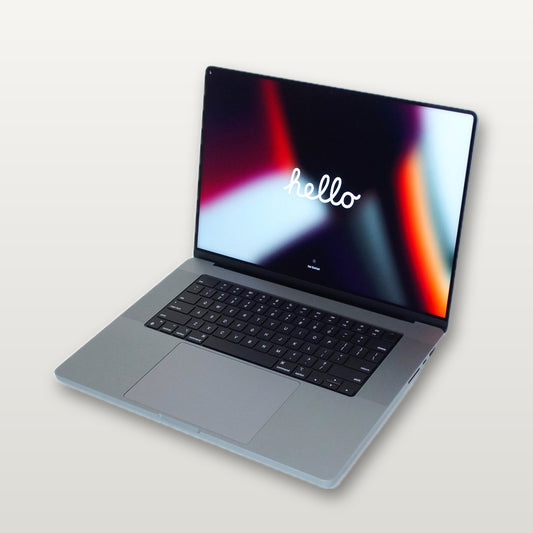
Buy the MacBook Pro if you're studying: Film/video production, music production/audio engineering, computer science (especially if doing ML/AI), architecture, 3D animation, graphic design (heavy Photoshop/Illustrator work), game development, or engineering with CAD software.
Side-by-Side Comparison
| Feature | MacBook Air M3 (Refurbished) | MacBook Pro 14" M3 Pro (Refurbished) |
|---|---|---|
| Price at MacPro-LA | Starting at $649 | Starting at $1,099 |
| Weight | 2.7 lbs | 3.4 lbs |
| Battery Life | Up to 18 hours | Up to 17 hours |
| Display | 13.6" Liquid Retina | 14.2" Liquid Retina XDR |
| RAM | 8-24GB | 18-36GB |
| Fan/Cooling | Fanless (silent) | Active cooling (fan) |
| Sustained Performance | Throttles under heavy loads | Maintains peak performance |
| Ports | 2x Thunderbolt, MagSafe, headphone | 3x Thunderbolt, MagSafe, HDMI, SD card, headphone |
| Speakers | 4-speaker system (good) | 6-speaker system (excellent) |
| ProRes Media Engine | No | Yes |
Why Most Students Should Get the MacBook Air
1. It Handles Everything Most Students Need
Let's be realistic about what 90% of college students actually do on their laptop:
- Writing papers in Google Docs or Microsoft Word
- Researching with dozens of browser tabs open
- Watching lecture recordings and taking notes
- Making presentations in PowerPoint or Keynote
- Zoom calls for remote classes
- Streaming music and video between classes
- Light photo editing for social media or projects
- Running basic coding assignments (Java, Python, HTML/CSS)
The MacBook Air handles all of this without breaking a sweat. It's not even close to struggling. You could have 40 Chrome tabs, Spotify, Word, and Zoom all running simultaneously and the Air won't flinch.
2. It's Lighter and Thinner
At 2.7 pounds, the MacBook Air is one of the lightest laptops you can buy. When you're carrying it in your backpack across campus all day, between classes, to the library, to the coffee shop — that 0.7 pound difference from the Pro adds up. Your back will thank you.
3. It's Completely Silent
The MacBook Air has no fan. Zero noise, ever. In a quiet library or during a lecture, you'll never have a fan spinning up and annoying the person next to you. The MacBook Pro's fan rarely kicks in, but it does under heavy workloads.
4. Battery Life Is Incredible
Up to 18 hours means you can genuinely go an entire day of classes, studying, and Netflix without plugging in. Leave the charger in your dorm room and don't worry about it.
5. The Price Difference Is Significant
At $649 refurbished (vs $1,099+ for the Pro), the Air saves you $450+ that could go toward textbooks, a monitor for your dorm, AirPods, or just not having debt. For a machine that does everything a student needs, paying more for the Pro is paying for power you won't use.
When You Actually Need the MacBook Pro
Film and Video Production Students
If you're editing video in Final Cut Pro, Premiere Pro, or DaVinci Resolve as part of your coursework, the MacBook Pro's Pro chip with the ProRes media engine makes a real difference. It renders faster, plays back complex timelines more smoothly, and doesn't throttle during long export sessions (the Air will throttle since it's fanless).
Music Production Students
Running Logic Pro, Ableton Live, or Pro Tools with dozens of tracks, virtual instruments, and plugins loaded simultaneously pushes past what the Air handles comfortably. The Pro's 18GB+ RAM and active cooling keep everything smooth during long recording and mixing sessions.
Computer Science Students Doing Heavy Work
Basic CS coursework (intro to programming, data structures, web development) is fine on the Air. But if you're running Docker containers, compiling large codebases, training machine learning models, or running virtual machines, the Pro's extra RAM and sustained performance matter. Upper-level CS students and grad students benefit from the Pro.
Architecture and 3D Design Students
Running AutoCAD, Revit (via Parallels), Rhino, SketchUp, or Blender with complex 3D models pushes GPU and RAM hard. The MacBook Pro 14" with M3 Pro gives you the headroom these applications demand.
Graphic Design Students With Heavy Workloads
If you're working on massive Photoshop files (hundreds of layers, 300+ DPI print projects), Illustrator files with thousands of objects, or InDesign layouts for magazines/books, the Pro handles it better. For typical design school assignments, the Air is usually enough, but production-level print design work benefits from the Pro.
What About the MacBook Air 15"?
Apple offers the MacBook Air in a 15.3-inch size. It's a great middle ground if you want the Air's simplicity and silence but need a bigger screen. Same chip as the 13-inch Air, same fanless design, just more screen real estate.
Consider the 15" Air if: You like the Air but wish the screen was bigger, you don't want to carry an external monitor, or you watch a lot of content on your laptop.
Budget Options — Get a Mac for Under $500
If budget is tight, these refurbished options get you a solid Mac for college:
- MacBook Air M1 — Starting at $449 — Still an excellent machine in 2026. Handles all student tasks effortlessly. Up to 18 hours of battery life.
- MacBook Pro 13" M1 — Starting at $549 — Slightly more powerful than the Air M1, with the Touch Bar and slightly better speakers.
- MacBook Air M2 — Starting at $549 — Newer design, slightly faster, great display. Our top pick for students on a budget.
Any of these will last through a 4-year degree without issue. Apple Silicon Macs age incredibly well because they're so efficient.
Accessories Every Student Needs
- USB-C hub ($30-60) — Adds USB-A ports, SD card reader, and HDMI for presentations
- External monitor ($150-300) — A 24" or 27" monitor for your dorm makes studying, writing papers, and research much easier
- AirPods ($79-179) — Essential for library study sessions and online classes
- Laptop sleeve or case ($20-40) — Protect your investment in your backpack
- External SSD ($50-100) — Extra storage for projects and backups
Frequently Asked Questions
How long will a MacBook last through college?
Any Apple Silicon MacBook (M1 or newer) will easily last 4-5 years of college use. Apple supports these machines with software updates for 7-8 years. If you buy a MacBook Air M2 today, it'll still be getting macOS updates when you graduate.
Can I run Windows on a Mac for school?
Yes. Using Parallels Desktop ($99/year student pricing), you can run Windows 11 on any Apple Silicon Mac. This lets you use Windows-only software required by some programs. Performance is excellent — most Windows apps run smoothly in a virtual machine.
Should I wait for back-to-school sales?
Apple's education pricing saves $100-200 on new Macs. But buying refurbished saves $400-800+. A refurbished MacBook Air M3 at $649 is still cheaper than a new one with education discount ($999). Don't wait for sales — buy refurbished now.
Is the MacBook Air good enough for coding?
For most programming: absolutely yes. Web development (HTML, CSS, JavaScript, React, Node.js), Python, Java, Swift — the Air handles all of it. You only need the Pro if you're regularly running multiple Docker containers, VMs, or compiling massive projects.
Our Recommendation
For 80% of college students: MacBook Air M2 or M3 refurbished ($549-$649). It does everything you need, lasts all day, weighs nothing, and saves you hundreds compared to buying new.
For film, music, CS, and design students who need power: MacBook Pro 14" M3 Pro refurbished ($1,099). Professional-grade performance at a student-friendly price.
Browse MacBook Air models | Browse MacBook Pro models
Questions about which Mac is right for your major? Call or text us at (323) 378-5603 — we love helping students find the right machine.
