




Mac mini 64GB RAM: Models, Cost and Who Needs It
Only the Mac mini with an M-series Pro chip can be configured with 64GB of unified memory. Today that is the M5 Pro model, and in the previous generation it was the M4 Pro. The memory is built into the chip package, so you choose it on day one and can’t add more later. If you want 64GB without Apple’s new-machine price, a refurbished M4 Pro is the practical route, and we stock one.
Below: which models offer 64GB, what the memory does for you, what it costs, and how to decide between 24GB, 48GB and 64GB.
TL;DR
- Among current Macs mini, the M5 Pro model is the one configurable with 24GB, 48GB or 64GB. The M6 model tops out at 32GB.
- Memory can’t be upgraded after purchase on Apple silicon, so buy for the heaviest work you expect in the next four to five years.
- 64GB mostly pays off for local AI models, large video and 3D projects, virtual machines and heavy multitasking. For email, browsing, office work and light editing, 16GB or 24GB is plenty.
- We sell a refurbished Mac mini M4 Pro with 64GB and a 1TB SSD, bench-tested, with a one-year warranty.
Table of Contents
- Which Mac mini models come with 64GB
- Can you upgrade a Mac mini’s memory later?
- What 64GB actually does for you
- What a 64GB Mac mini costs in the US
- Which memory size fits you
- Our view: buy the memory, skip the premium
- How to buy a high-memory Mac mini safely
- FAQ
- Sources
Which Mac mini models come with 64GB
The Mac mini line has had a 64GB option twice. The first time was the 2018 Intel model, which Apple launched with up to 64GB of memory in SO-DIMM slots on paper, but those machines are now old and are not what most people searching today are after. The second time is the Apple silicon Pro generation.
Here is how the lineup looks now:
| Model | Memory options | Ports |
|---|---|---|
| Mac mini M6 | 16GB, 24GB, 32GB | Thunderbolt 4, up to 40Gb/s |
| Mac mini M5 Pro | 24GB, 48GB, 64GB | Thunderbolt 5, up to 120Gb/s |
The memory figures and port speeds come from MacRumors’ Mac mini roundup. The takeaway is simple: if the number 64 matters to you, you are shopping for a Pro chip. No base chip Mac mini reaches it.
The previous generation, the M4 Pro Mac mini, offered 48GB or 64GB of unified memory with 1TB to 8TB of storage, according to Apple’s tech specs page. Those machines remain very capable, which is where refurbished stock matters.
Why some configurations are hard to find new
In May 2026, Apple removed some higher-memory Mac mini and Mac Studio configurations while a global memory shortage continued. Availability of top memory tiers on new machines can therefore shift. Check Apple’s configurator for what it offers on the day you buy.
Can you upgrade a Mac mini’s memory later?
No, not on any Apple silicon Mac mini. The memory sits inside the same package as the chip, shared by the CPU, GPU and Neural Engine, and it can’t be upgraded after purchase. Only the old Intel models used replaceable RAM.
Two practical consequences follow:
- Beware of listings that promise a RAM upgrade. If a seller says they swapped memory in an Apple silicon mini, be skeptical. A reputable seller states the factory configuration.
- Read the spec line carefully. The chip, memory and SSD are fixed together at the factory. A listing that says “M4 Pro, 64GB, 1TB” tells you exactly what the machine will always be.
Storage is easier to live with than memory. You can add fast external SSDs over Thunderbolt. Nothing external replaces missing RAM.
What 64GB actually does for you
Unified memory is a single pool. When you run out, macOS moves data to the SSD, which is called swapping, and everything slows. More memory means less swapping. That is all 64GB buys, but for some work it is the difference between usable and frustrating.
Local AI and large language models
This is the main reason searches for “64GB Mac mini” have grown. Large language models have to fit in memory to run well. Roughly 48GB to 56GB of a 64GB machine can be made available to the GPU for inference, which is why 64GB is often described as the sweet spot for running 70-billion-parameter models at a usable, if not instant, pace according to LocalAIMaster.
Two honest caveats:
- Speed depends on memory bandwidth. Token generation on the M4 Pro is bound by how fast it streams model weights from memory. A desktop graphics card is faster on models that fit in its VRAM. The Apple advantage is running models that would not fit at all.
- It is not a server. A Mac mini with 64GB is great for one developer or a small team experimenting. Serving many simultaneous users is a job for dedicated server hardware, and we would not sell you a mini for that.
One developer review reports that with 64GB they comfortably run 32B models and have tried 70B ones, while people with 24GB or 32GB saw swapping on moderately sized models. Treat it as one person’s experience, not a benchmark, but it matches the general logic: model size sets your memory floor.
Video, 3D and music production
Long 4K and 8K timelines with effects, large After Effects compositions, Blender scenes with heavy textures and big Logic Pro sessions with many sample libraries all love memory. If you routinely see memory pressure turn yellow or red in Activity Monitor on your current Mac, 64GB is a sound upgrade. If it stays green, it is not.
Virtual machines and development
Running several virtual machines, Docker containers, a local database and an IDE at once adds up quickly. A developer who keeps a Windows or Linux VM running next to Xcode and a browser with dozens of tabs will use 32GB without trying. 64GB gives you headroom for years.
When you don’t need it
Most people don’t. Email, web, documents, streaming, photo editing in Lightroom, and light video editing run well on 16GB and comfortably on 24GB. MacRumors’ buyer’s guide says that for most everyday users the M6 model offers better single-core performance and future-proofing, and that the M5 Pro makes sense mainly for sustained, heavily parallel workloads. Paying for memory you never touch is the most common overspend in Mac buying.
What a 64GB Mac mini costs in the US
The M5 Pro Mac mini starts at $1,699 with 24GB of memory and a 512GB SSD. Moving to 64GB and a larger SSD raises that figure considerably, and Apple’s configurator shows the exact total for your choices.
It also helps to know that building up the cheaper M6 model with extra memory and storage can push its price uncomfortably close to the M5 Pro, which has better performance and I/O. That is why people who want lots of memory skip the base chip altogether.
This is where refurbished stock changes the math. A like-new previous-generation Pro model delivers the same 64GB ceiling for noticeably less than a new configuration, and you give up little in everyday speed.

Our M4 Pro 64GB Mac mini
We list the Apple Mac mini M4 Pro with a 14-core CPU, 20-core GPU, 64GB of memory and a 1TB SSD in silver. Every device we sell is bench-tested and graded for cosmetic condition before listing, and it comes with:
- a one-year MacPro-LA warranty handled by our own team
- free two-day shipping
- a 30-day return policy
- local pickup at our Hollywood, California store
Stock moves quickly on high-memory machines, so check the listing for current availability and price.

Which memory size fits you
Use the work you do today, plus one honest step up, as your guide.
| Your main use | Sensible memory | Why |
|---|---|---|
| Browsing, office, streaming, school | 16GB | Plenty for daily use, lowest cost |
| Photo editing, light video, programming | 24GB | Room for many apps and projects |
| Heavy video, music production, several VMs | 32GB to 48GB | Avoids swapping on big projects |
| Local AI with large models, 3D, huge datasets | 64GB | Fits larger models and many loaded at once |
If your use sits on the line between two rows, remember the rule: memory can’t be added later. Stepping up one tier is cheap insurance on a machine you will keep for years. Stepping up two is rarely needed.
If you’re on a budget
A 64GB machine is a serious spend even when refurbished. If your work is lighter, our Mac mini range covers it. The M4 Mac mini with 24GB and 256GB suits developers and creators who want modern speed and room to multitask. The M4 with 16GB and 256GB covers students and home offices. Browse everything in the Mac mini collection.
If you need 64GB but want a laptop
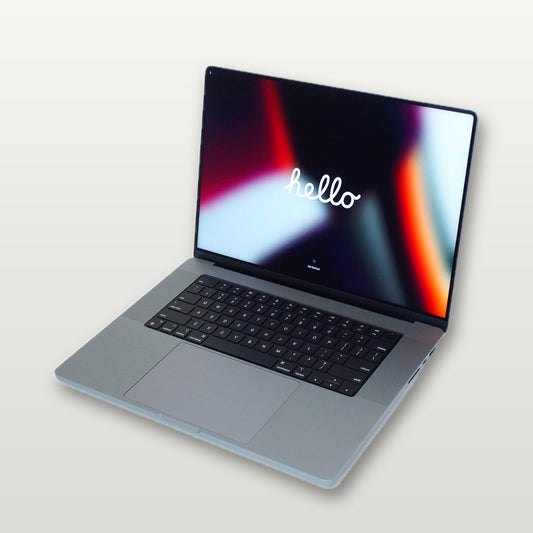
The same memory ceiling is available in a portable. We have listed a MacBook Pro 16-inch with an M1 Max and 64GB of memory. It is an older chip, but it holds a lot in memory, and it travels.
Our view: buy the memory, skip the premium
We test and grade Macs every day, and the pattern we see is consistent: people regret too little memory far more often than too little storage. Storage can be extended with an external drive. Memory is soldered to the chip.
At the same time, we won’t tell you to buy 64GB because it sounds impressive. If you are not running large models, heavy projects or multiple virtual machines, the money is better spent on a bigger SSD or a nicer display. When you are, a 64GB M4 Pro is one of the best values in the Apple lineup, because the generation just behind the newest keeps nearly all the capability at a much lower price.

Buying refurbished only works if the seller stands behind the machine. That is why we bench-test and grade every device, state the condition in the listing, and handle warranty claims ourselves rather than passing you to a third party. If a machine needs attention, you talk to our staff, and if you live near us you can pick it up in Hollywood and check it in person.
For a Mac you intend to keep for years, we also offer protection plans. Our Care+ plan is listed at $19 per month and a one-year plan at $199 per year, on the protection plan page.
— Pro-
How to buy a high-memory Mac mini safely
- Confirm the exact configuration. The listing should name the chip, CPU and GPU core counts, memory and SSD size.
- Check the condition grade. Cosmetic grade doesn’t affect speed, but you should know what you are getting.
- Look for a real warranty and a return window. One year of coverage and 30 days to return is a fair standard.
- Ask who services it. In-house handling means one phone call, not a claims maze.
- Plan your ports. The M4 Pro model has Thunderbolt 5 and 10Gb Ethernet, useful for fast external storage and networks, per Apple’s specs.
- Don’t pay for upgrades the seller can’t prove. Apple silicon memory is factory-fixed.
FAQ
Does the Mac mini M4 have a 64GB option?
No. The standard M4 Mac mini topped out at 32GB. The 64GB option came with the M4 Pro chip. Today the same applies in the new generation: the M6 model stops at 32GB, and 64GB belongs to the M5 Pro.
Is 64GB of RAM overkill for a Mac mini?
For everyday work, yes. For local AI models in the 30B to 70B range, large video or 3D projects and several virtual machines, it is a sensible amount. If your Activity Monitor memory pressure stays green on 16GB, you don’t need it.
Can I add RAM to a Mac mini later?
Not on Apple silicon models. The memory is part of the chip package and can’t be upgraded after purchase. Choose the amount you need before you buy.
Is a refurbished 64GB Mac mini a good idea?
It can be, if the seller tests the machine, grades it honestly and backs it with a warranty and a return window. Ours are bench-tested and come with a one-year warranty, free two-day shipping and 30-day returns.
Should I choose the M6 or the M5 Pro?
If you want more than 32GB of memory, you need the Pro. If not, MacRumors’ buyer’s guide suggests the M6 is the better choice for most people, with the Pro reserved for sustained, parallel workloads.
Sources
- MacRumors: Mac mini roundup
- MacRumors: M6 vs. M5 Pro Mac mini buyer’s guide
- MacRumors: Apple cuts more Mac Studio and Mac mini RAM options
- Crufti: Memory for Mac mini
- CraftRigs: M4 Pro 64GB vs RTX 4090 for local LLMs
- LocalAIMaster: Best Mac for local AI
- TeachMeIdea: 70B models on a Mac mini
- Arsturn: Mac mini M4 Pro local AI review
